Sewing Log Book for KDP: A Complete Interior Template That Eliminates Design Delays
For publishers working in the low-content space, time spent on interior formatting often becomes the bottleneck between a good idea and a live listing. The Sewing Log Book for KDP addresses that gap directly. Instead of building page layouts from scratch, you receive a professionally prepared interior that matches Amazon’s trim and bleed specifications. This download is not a vague collection of prompts or a set of guidelines—it is a finished product file that you can upload immediately or customize further to align with your brand.
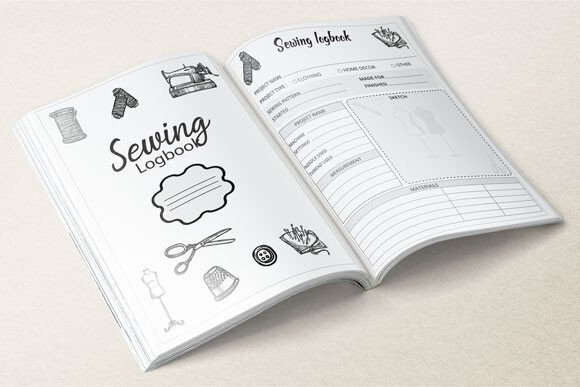
The package itself is a single ZIP file containing one ready-to-print PDF and 120 individual JPEG pages, all sized at 8.5 by 11.25 inches with full bleed. That specific measurement is critical. It accounts for the trim edge on an 8.5 by 11-inch book, giving you enough margin to avoid white slivers along the border after the book is printed. When you open the ZIP, you are looking at a complete, repeatable system that can serve multiple titles across your publishing catalog.
What the ZIP Contains and Why Each File Matters
Understanding the contents of the Sewing Log Book for KDP download helps you move faster during preparation. The ZIP bundles three essential assets:
- 1 PDF file: This is your primary upload file for Amazon KDP. It is print-ready, meaning the typography, margins, and page count are already verified to pass the platform’s automated checks. You do not need to export, adjust fonts, or worry about missing elements. Simply upload it during the book creation step.
- 120 pages JPEG file (folder): Each page is supplied as a high-resolution JPEG. This gives you the flexibility to open specific pages in graphics software, add a logo, change the background, or swap out headers without touching the original PDF. It is especially useful if you plan to create variations for different sewing niches—quilting, dressmaking, embroidery, and so on.
- 8.5 x 11.25 inches with bleed: The dimensions are chosen to work with KDP’s standard trim size of 8.5 x 11 inches. The extra 0.25 inches in height (0.125 inches top and bottom) ensures that full-page backgrounds or borders extend safely past the cut line. No manual adjustment is needed here; the file is already built to the correct canvas size.
This combination means you are purchasing a complete interior, not a starter kit. You can use it as-is on day one, or treat it as a robust foundation that supports incremental improvements over time.
Where a Pre-Made Sewing Log Book Fits Into a Broader Publishing Workflow
The typical low-content publishing process follows a sequence: niche research, keyword selection, interior creation, cover design, upload, and launch. For many creators, interior creation is a repetitive, technical task that consumes hours better spent on marketing or niche expansion. The Sewing Log Book for KDP replaces that step with a verified, print-ready asset. When you receive the files, you can immediately move to cover design and keyword optimization.
Think of the log book as a modular component. It does not lock you into a single title. You can repurpose the same interior for multiple covers, target different sewing communities, or offer it as part of a bundle. Because the interior is already formatted, you avoid the inconsistency that sometimes creeps in when designers rush to meet a self-imposed deadline. The result is a more professional product and fewer post-upload corrections.
The template also interacts naturally with the other tools in your arsenal. You might use a keyword research tool to identify high-traffic, low-competition sewing phrases, then build a book title and description around those terms. While you do that, the interior is already sitting ready, waiting for the cover file to complete the package. This parallel workflow collapses the timeline between idea and publication.
Preparing and Uploading the PDF to Amazon KDP
Once you unzip the Sewing Log Book for KDP package, locate the PDF file. Before you upload, verify that your KDP account’s book setup matches the file dimensions. You will set the trim size to 8.5 by 11 inches, which aligns with the bleed-ready canvas of 8.5 by 11.25 inches. Here are the immediate steps that lead to a smooth upload:
- Create a new paperback or hardcover project in KDP.
- Enter your book details, including title, author name, and description.
- Choose “8.5 x 11 inches” as the trim size.
- Select “Bleed” from the set-up options. Even though the PDF already includes bleed, this step tells the print system to expect it.
- Upload the PDF as the interior file. KDP’s online previewer will show you exactly how pages look, including trim edges.
- Review every spread in the previewer. Check for any content that appears too close to the trim line. Because the file is already built with safe margins, you should see no surprises.
If you have never handled a bleed document before, the 8.5 by 11.25-inch measurement might seem odd. It makes sense once you understand that the printer trims 0.125 inches from the top, bottom, and outside edges after binding. The extra space in the PDF guarantees that any image or color reaching the edge of the page does so cleanly. If you open the JPEG files and extend a background color all the way to the canvas border, that color will print edge-to-edge after trimming.
Customizing the JPEG Files Without Breaking the Layout
While the PDF works immediately, the JPEG folder opens a door for personalization. Publishers who want to add a small logo, a QR code, or a unique font treatment can do so page by page. Using software like Affinity Photo, Photoshop, or even Canva, you can open a JPEG, overlay your element, and save a new version. The critical practice here is to always keep the original canvas size intact. Do not resize or crop the image; instead, keep the dimension at 8.5 by 11.25 inches and maintain the bleed-safe area.
After customizing multiple pages, you can either recombine them into a new PDF or replace only specific pages within the original. This flexibility matters when you plan to build a series. For example, you might start with a generic Sewing Log Book, then create a version tailored to beginner garment sewers that includes a slightly different header on each project page. Instead of designing 120 pages from scratch, you edit a handful of existing JPEGs and rebuild the PDF.
During this process, stay mindful of image resolution. The JPEGs are supplied at a resolution suitable for print; if you add low-resolution overlays or stretch graphics, the final output can appear pixelated. Always check a test page by printing it at home or zooming to actual size in a PDF viewer before uploading the final file to KDP.
Quality Control and Long-Term Consistency
One of the hidden benefits of using a professionally prepared interior is consistency. When you create interiors manually, minor errors accumulate—slightly misaligned text boxes, inconsistent margin sizes, or variations in font embedding. The Sewing Log Book for KDP file has been put together with those pitfalls already addressed. Fonts are embedded in the PDF, margins are uniform across all 120 pages, and the bleed zone is correctly set from page one.
From a quality-control perspective, this drastically cuts down the iteration cycle. You do not need to request proof copies only to discover that text has disappeared into the gutter or that a header shifted during export. The predictable nature of the file means you can order a single proof copy per new cover variation, confident that the interior will reproduce exactly as shown in the online previewer.
Over time, this reliability becomes a competitive advantage. You can launch new sewing-related journals with shorter turnaround times, maintain a growing catalog without accumulating technical debt, and spend more energy on the customer-facing side of your business—things like cover aesthetics and listing optimization.
Integrating the Sewing Log Book With Other Tools and Resources
The Sewing Log Book for KDP does not exist in isolation. It performs best when it becomes part of a larger system. Consider how the interior connects with the following parts of your publishing operation:
- Cover design software: Use Canva or Book Bolt to create a full wrap cover that matches the trim size. Since the interior is already set to 8.5 x 11 inches with bleed, your cover template must follow the same spec. KDP provides a cover calculator that uses the interior page count; with 120 pages, you will get the exact spine width and total cover dimensions.
- Keyword and niche research tools: When you identify a long-tail keyword like “sewing project tracker for beginners,” you can verify that the log book’s layout supports that audience. The template’s headers and section prompts should align with the promise made in your listing. If the interior needs slight tweaks, the JPEG files let you match the content to the keyword promise.
- Print proof workflows: Some creators send a proof copy to a trusted reviewer or sewist for feedback. Because you have the JPEG files, you can share individual pages as images for quick comments before finalizing the PDF.
- Listing copy and A+ content: The structured pages inside the log book—where sewers log project names, fabric types, needle sizes, and notes—give you concrete material to describe in bullet points and enhanced brand content. You can screenshot a few interior pages (watermarked if necessary) to show buyers exactly what they will receive.
By viewing the log book as a resource that feeds into back-end systems, you reduce duplicated effort. One well-prepared interior supports multiple launch cycles without demanding a fresh design contract each time.
Practical Implementation for Different Types of Publishers
The path you take with the Sewing Log Book for KDP depends on your publishing style and goals. Consider how a few distinct user profiles might integrate the product:
The First-Time Low-Content Publisher
You are still learning the KDP platform. With the ready PDF, you can eliminate the interior-creation learning curve and focus on the upload process, cover basics, and category selection. Start by uploading the file as-is, using a simple Canva cover template, and submitting for review. Once the book is live, study which keywords bring traffic and slowly learn interior customization by experimenting with the JPEGs on a copy of the file, not the original.
The Serial Entrepreneur Building a Catalog
You already have several puzzle books, journals, or coloring books published. The sewing niche fits into your broader portfolio. Because the log book arrives fully formatted, you can create multiple variants—perhaps a Wedding Sewing Journal, a Quilting Log, or a Fashion Design Sketchbook combined with sewing logs—all from the same core file. Use the JPEG folder to modify a few header texts per variant, re-export, and launch a themed series within a single week.
The Hobbyist Sewer Turned Publisher
You understand what sewers actually need to track: pattern numbers, fabric swatch IDs, stitch types, fit adjustments, and project deadlines. The existing log book layout may already cover most of those fields, but you might want to refine a few sections based on your own sewing experience. Because the template handles the technical bleed and margin setup, you can focus solely on the usability of each log page, making the book genuinely useful for the community you know well.
Factors That Influence Long-Term Usability
As you incorporate the log book into your workflow, several factors determine how sustainable this asset becomes over time:
Organization: Keep the original ZIP file and a backup on cloud storage. When you create a new variant, save a fresh folder with the book title and date. This habit prevents you from losing track of which version has been edited and which is the untouched original.
Efficiency: Batch your work. You can design five covers in one sitting, then upload all five interiors (same PDF, different titles) in sequence. KDP’s dashboard lets you duplicate a project and change only the essential details, making multi-title launches manageable with a single interior file.
Consistency: If you plan to sell sewing log books under a brand, keep the same interior structure across your catalog. Buyers who like one of your books will appreciate finding a familiar layout in another. The JPEG customization option lets you make small branding tweaks without overhauling the established page sequence.
Quality control: Every time you re-export a PDF from JPEGs, run the new file through KDP’s print previewer. Even small changes, like adding a graphic, can shift the compression or page order if not handled carefully. A quick preview check takes minutes and avoids returns or negative reviews.
Moving From a Single Log Book to a Repeatable Publishing Process
The real value of the Sewing Log Book for KDP becomes apparent when you stop seeing it as a one-off product and start treating it as a template engine. The same structure—intentional bleed dimensions, a clean JPEG set, and a verified PDF—can be replicated for other niches. Once you understand how the files are built, you can reverse-engineer the approach for fitness trackers, meal planners, vehicle maintenance logs, or any other specialty journal. The sewing log book then functions as both a ready-to-sell asset and a learning tool that improves your overall publishing skills.
Publishers who work methodically often find that the initial purchase pays for itself not through a single book sale, but through the time it saves across dozens of projects. Instead of allocating six to ten hours for interior creation per book, you spend that time where it directly impacts visibility and sales—on competitive research, compelling cover design, and connecting with your target audience through social channels or email lists.
When you evaluate the total workflow, the download reduces friction at the stage that causes the most operational drag. You move from idea to published book with fewer technical interruptions, and the files themselves are straightforward enough to hand off to a virtual assistant or collaborator if you choose to scale your publishing operation further.
Using the Log Book as a Practical Foundation for Client Work
Freelancers and agencies who provide KDP publishing services can also incorporate the Sewing Log Book for KDP into client projects. A client might request a sewing project organizer as part of a larger branded product line. Instead of commissioning a designer to build 120 custom pages, you can license the template, add the client’s branding elements through the JPEG files, and deliver a polished, print-ready PDF days sooner than a ground-up creation would allow. This speed improves client satisfaction and allows you to take on more projects within the same timeframe.
The log book’s structure is compatible with most design tools that can open JPEGs and export PDFs, so you are not locked into proprietary software. Even open-source editors like GIMP can handle the page customization if you follow the canvas size and resolution constraints. This cross-platform usability ensures that the asset remains useful regardless of your preferred tech stack.
Both in solo publishing and in client-facing work, the key is to recognize that the files are designed to integrate, not to dominate. They sit inside your broader process—research, design, review, publish—and do exactly the job they are built for: providing a dependable interior that meets KDP’s mechanical requirements without slowing you down.