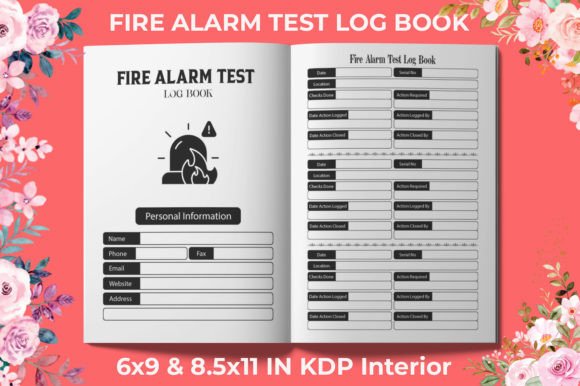
A Fire Alarm Test Log Book That Works First Time on Amazon KDP
If you’re creating a safety record book for building managers, electricians, or facility teams, a Fire Alarm Test Log Book is one of those low-content interiors that sells steadily when it’s made right. The idea is simple: a structured journal where weekly fire alarm inspections, tests, and maintenance notes are recorded. But there’s a gap between having a decent design and having a file that uploads to Kindle Direct Publishing without triggering formatting errors, blurry prints, or customer returns. A ready-to-upload Fire Alarm Test Log Book interior solves that gap — if you understand the file types and what really makes a difference on KDP.
What's Actually Inside a Ready-Made Fire Alarm Test Log Book Product
When you buy a pre-designed interior for a Fire Alarm Test Log Book, you’re not just getting a few pages. You’re typically handed a set of tested files: a 120-page PDF that’s already formatted for the most popular trim sizes, sometimes a second PDF variant, and high-resolution JPG versions of every page. The specifications often include 300 DPI, no bleed, and two practical dimensions — 6×9 inches and 8.5×11 inches. These aren't random extras; they’re chosen because they align with what Amazon KDP expects and what your customers actually want for a reference logbook they’ll use on a desk or clipboard.
The 120-page count strikes a practical balance. Too few pages, and the book feels flimsy for a full year of testing. Too many, and the spine gets unwieldy and the print cost goes up. A 6×9 version works for portability; an 8.5×11 gives more room for handwritten notes during inspections. Both need to be no bleed interiors, meaning the content stays within safe margins so nothing gets trimmed off by the printers. And 300 DPI ensures that lines, checkboxes, and header text stay crisp — something not every ready-made interior guarantees.
Common Mistakes That Delay Publishing or Hurt Print Quality
It’s easy to assume that any PDF will work, but KDP has a specific way of handling interiors. A frequent mistake is uploading a file with mixed color profiles, accidental transparency, or fonts that aren’t embedded. You might see a perfect preview on your screen and then receive a proof copy with ghosting, shifted tables, or missing elements. Another overlooked detail is page count justification. If you’re given a 120-page PDF but you want to add an introductory page or a blank note section at the end, simply inserting pages can alter the gutter margin alignment. That’s why a KDP tested file — one that’s already passed Amazon’s automated checks — saves hours of troubleshooting.
Bleed settings trip up many new publishers. A Fire Alarm Test Log Book is an interior-only notebook; it does not require bleed because there are no images running off the page edge. Yet some sellers still provide files with bleed active, which can cause Amazon to reject the upload or scale the pages incorrectly. Choosing a product specifically marked as no bleed avoids that entirely. Similarly, not all JPG files are created equal. A low-quality JPG might be compressed to a point where small section headings or fine grid lines become fuzzy. The better files are exported at 300 DPI with minimal compression, practically identical in clarity to the vector PDFs.
Why Having Both a 6×9 and an 8.5×11 Version Matters
People using a Fire Alarm Test Log Book are performing a compliance task — they need to write clearly, sign off on checks, and leave room for any additional observations. An 8.5×11 book offers a full-page layout with generous line spacing, which is ideal for commercial properties where multiple systems are being tested. However, some facility managers prefer a smaller 6×9 booklet that fits inside a go-bag or a safety binder. Having both sizes in the same purchase lets you publish two distinct product listings or offer a choice without redesigning anything. It also broadens your market because some customers search specifically for a compact log book, while others expect a larger reference format.
If you only have one dimension and try to scale it, you’ll end up with stretched or squashed elements. The careful buyer checks that both sizes are provided as separate, fully formatted files — not just a single file resized. And because these interiors are high-resolution, the text remains legible in either trim without pixelation, even on the smaller 6×9 pages where the font size naturally appears reduced.
File Format Confusion: PDF vs JPG and When to Use Each
Many people believe that PDF is always the safest choice for KDP, and for a text-based Fire Alarm Test Log Book that’s generally true. A well-structured PDF preserves vector lines, sharp typography, and correct page ordering. The 2 PDF option you often see — one for each size — means you can upload directly without touching a layout application. But what about JPGs? Some publishers prefer starting with individual page images if they want to tweak a header in Canva or Photoshop before reassembling. The JPG files, when provided at 300 DPI, give that flexibility. The mistake is expecting that a JPG will work as a direct upload to KDP’s paperback interior; KDP accepts PDF for print interiors. The JPGs serve as a source, not the final upload file. Keeping that distinction avoids confusion and wasted upload attempts.
Additionally, if you receive a product that includes both PDF and JPG, you’re not forced to use one exclusively. You might use the JPGs to quickly proofread the layout on your phone, or to create a matching cover template. Then you rely on the tested PDF to publish. This kind of dual delivery is a signal that the creator understands real workflows, not just a quick export.
How to Verify a Fire Alarm Test Log Book Interior Before Spending Time on It
Before you upload anything to KDP, open the PDF in Adobe Acrobat or a similar reader and check the Document Properties. Look for the page size — does it precisely match the stated 6×9 or 8.5×11 inches? If it’s off by even a fraction, Amazon’s system may flag it. Scroll through a few pages at 400% zoom. The lines should be solid black, not fuzzy grey patterns from JPEG compression. Ensure there are no hidden objects or white boxes placed outside the trim area that could trigger bleed detection. Also confirm the page count: a 120-page PDF should actually have 120 pages. Some low-effort products count the front and back of a sheet incorrectly, leaving you with a mismatched interior.
Another practical check: print two or three pages on your home printer at actual size. Even if your printer isn’t production quality, you’ll see whether margins feel balanced and whether the log tables have enough space for handwritten entries. A well-designed fire alarm test sheet leaves at least 7mm of inner margin near the binding, so writing doesn’t disappear into the gutter. If the file doesn’t account for that, it will be difficult to write on every page. A KDP tested file typically has this margin built in.
Realistic Advice for Self-Publishers Entering the Safety Log Niche
You might be tempted to design a Fire Alarm Test Log Book from scratch, and that’s fine if you have a strong grasp of interior formatting. But for many, the difference between a weekend of frustration and a published listing in an afternoon is a ready-made file that’s already gone through Amazon’s gauntlet. The errors that get you stuck — “margins must be 0.25 inches,” “bleed settings do not match,” “insufficient resolution” — are pre-solved in a product that states Ready to upload on KDP. It doesn’t mean you lose creative control. You can still design a custom cover that matches the interior style, and you can even adjust the log book’s branding elements on the title page if you have editable files.
What you shouldn’t do is ignore the technical specs. If the product says 300 DPI, but the extracted images look slightly soft, reach out to the seller before assuming it’s fine. If the product offers only one size and you attempt to stretch it to a third, the result will always disappoint the buyer. And if you plan to upload the interior to KDP, stick with the provided PDF. Using the JPGs as a direct upload will almost certainly fail KDP’s content review, not because the art is bad, but because the format is wrong. Treat the PDF as your production file and the JPGs as a supplementary asset.
Making a Better Choice Than the Average Off-the-Shelf Log Book
Not all fire alarm test log interiors are built with the end user in mind. Some have crowded tables, tiny eight-point font, or no room for the technician’s signature. Others don’t separate weekly checks from monthly battery tests clearly. A thoughtful design includes clear column headers like “Date,” “Device Tested,” “Alarm Sounder Operational,” “Action Taken,” and “Inspector Name.” It also uses repeating page layouts so the recording habit is easy to maintain. When a facility operator holds your Fire Alarm Test Log Book, they shouldn’t have to guess where to write critical information. The layout should feel familiar, almost intuitive, because it follows the natural order of an inspection walkthrough.
If you’re evaluating a ready-to-upload interior, check whether the preview shows enough white space. Dense gridlines might look neat on screen but become visually noisy when printed. A slight line weight for borders, combined with an open, airy table structure, improves usability dramatically. The best 120-page files aren’t just page count fillers; they’re planned so each two-page spread represents a logical inspection period without awkward page breaks mid-section. That kind of intentional flow is what transforms a generic notebook into a practical compliance tool.
There’s also the matter of consistency across print runs. A PDF exported with proper PDF/X standards will produce the same output every time, eliminating the variability you might get from a consumer-grade word processor export. That’s another reason why high-resolution interiors that have been KDP tested provide a level of reliability that repurposed templates often lack. When you’re building a brand around safety documentation, a single quality issue — like a smeared checkbox on page 87 — can lead to a bad review that mentions “poor quality.” It’s much harder to recover from that than to start with a file that’s already proven to work.
Ultimately, a ready-made Fire Alarm Test Log Book interior is about saving time and avoiding the small but costly errors that plague self-publishers. The combo of 2 PDF (one for each size), JPG pages, and clear specifications like no bleed and 300 DPI isn’t just marketing language. It’s a practical package that addresses what actually goes wrong during the KDP upload process. Taking a few moments to inspect the files before publishing — checking the margins, verifying the resolution, and resisting the urge to resize without care — will keep your listing professional and your customers satisfied. And when you’re ready to expand into other log book formats, the same verification habits will serve you well across the entire safety and maintenance niche.